Getting Started
Getting Started: Program Admin
You control how your agency uses APBnet™ and how your agency's content is displayed to users across the platform. Here's what to configure first and how to keep the program running well.
Program Admin is a permission layered on top of your Creator or Viewer role, not a replacement for it. If you haven’t already, start with Getting Started: Creator or Getting Started: Viewer to cover the fundamentals.
What you control as a Program Admin
Program Admins set the rules for the entire agency. Your settings determine what your users can do, who they can reach, and how the platform performs for your organization.
- Enable or disable features for your agency — control what your users see and can do
- Configure your agency's bulletin banner, footer text, dispatch policy, and CC'd recipient lists
- Review leads reporting data — see how many bulletins generated leads and track APBnet's effectiveness for your agency
- Check agency Usage metrics — active/stale users, bulletins created and dispatched, and bulletin acknowledgment rate
- Permanently delete bulletin content for compliance or legal hold requirements — an irreversible, agency-scoped action
- Serve as the escalation point for access and permission questions your User Admin can't resolve
First things to do after logging in
These three steps get your agency configured correctly before your users start sending bulletins.
- 1
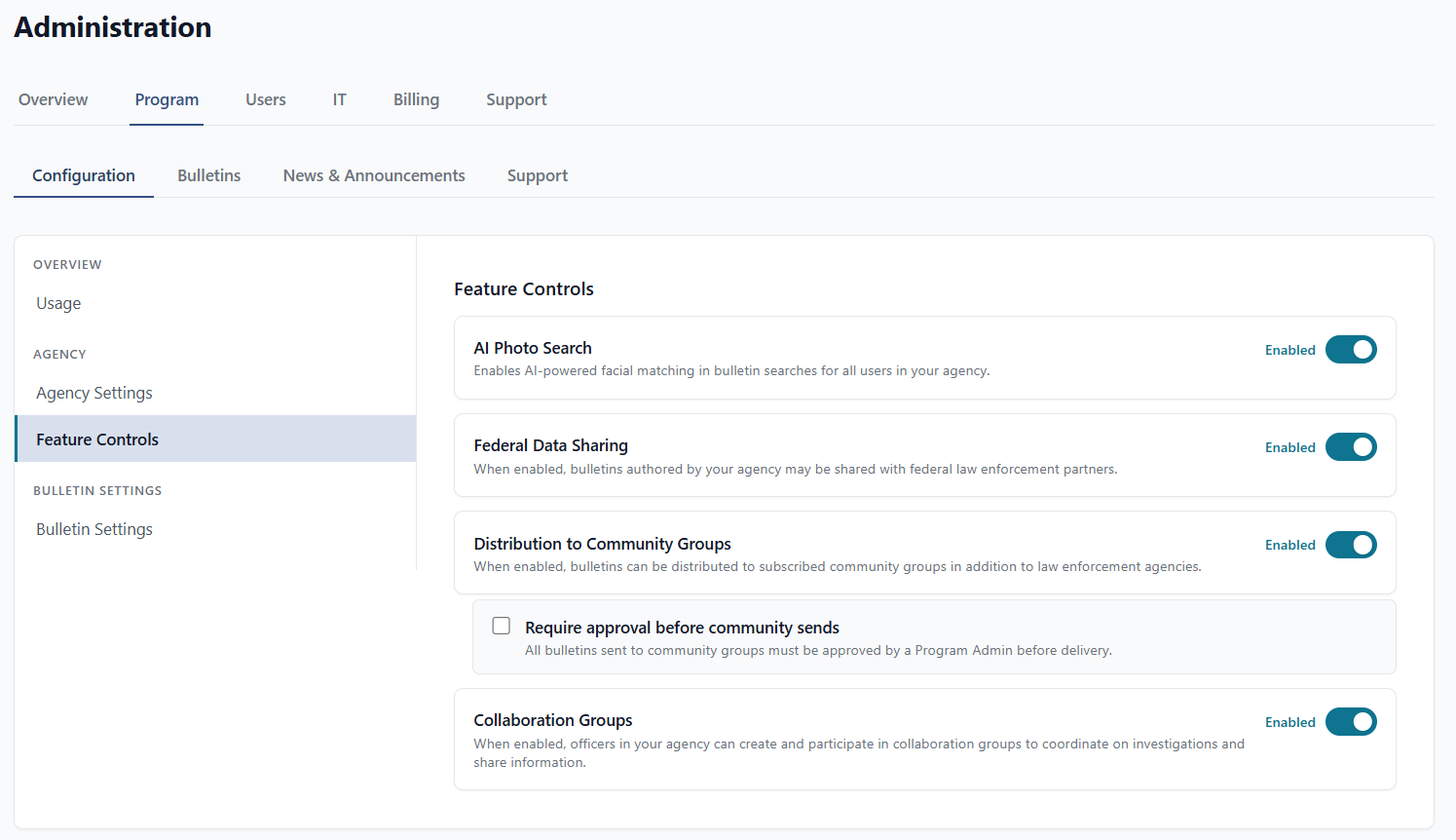
Review and configure feature access
Select Admin > Program > Feature Controls. You'll see every feature available to your agency and whether it's currently on or off. Decide what to enable before your users log in — changes take effect immediately and your users will see them the next time they open the app.
- 2
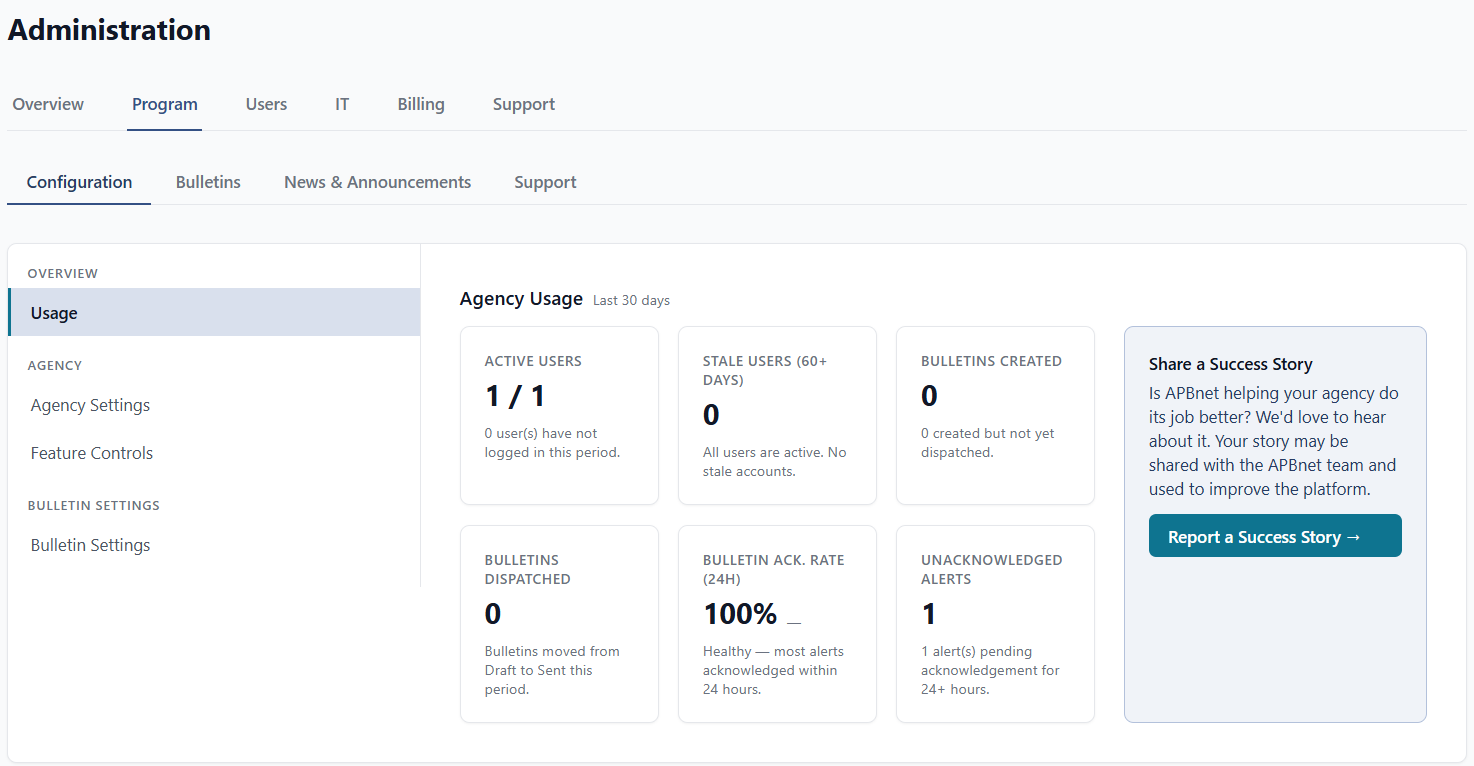
Check your agency's Usage tab
Select Admin > Program > Overview > Usage. Even if your agency is just getting started, familiarize yourself with the metrics available — active and stale users, bulletins created and dispatched, and your bulletin acknowledgment rate. This is where you'll track whether APBnet™ is working as intended for your agency over time.
- 3
Set expectations with your Creators about leads reporting
Seven days after a Creator sends a bulletin, APBnet™ asks one question: did it generate a lead? The answer is yes, no, or pending. Creators can also respond at any time from their Sent folder. This data tells you how effectively the platform is working. It only works if Creators know it's expected — communicate that during onboarding.
Essential how-to guides
These guides cover the tasks you'll return to most often.
Controlling Feature Access
Turn features on or off for your entire agency — and understand what each setting affects for your users.
Read the guide →
Configuring Bulletin Settings
Set your agency's bulletin banner, footer text, dispatch policy, and distribution/training recipient lists.
Read the guide →
Map-Based Distribution Selection
Understand how Creators select distribution areas so you can train and support them effectively.
Read the guide →
Understanding Your Inbox
Learn the five inbox tabs — Received, Sent, Saved, Messages, and Feed — and how they work together.
Read the guide →
Tips for Program Admins
Configure features before your users log in for the first time
Feature settings take effect immediately. If you turn a feature on after users have already formed habits, you'll need to re-communicate it. Review the feature access panel during setup — not after rollout.
Leads reporting only works if Creators know it's expected
Seven days after sending a bulletin, APBnet™ asks the author whether it generated a lead. The data is only useful if authors respond. Set the expectation during training: answering the lead prompt is part of the job, not optional.
Check Usage monthly — not just when something goes wrong
The Usage tab shows active/stale users, bulletins created and dispatched, and your bulletin acknowledgment rate. A monthly review tells you whether APBnet™ is being used as intended and where you may need to re-train or re-engage specific users.
Permanently Delete is for compliance and legal hold — not routine cleanup
Found under Admin > Program > Bulletins, this destroys a bulletin's content and photos everywhere it was received, and can't be undone. It only applies to your own agency's bulletins, requires typing the bulletin ID to confirm, and asks for a documented reason — reserve it for genuine compliance or legal-hold situations, not routine cleanup.
Where to get help
For questions about feature settings or usage data, use the support form in the Admin tab. The Critical Reach team can also adjust agency relationships that aren't configurable from within the app.